Shape OpenAI API traffic around model capacity and project ownership. Separate request throttling, sudden traffic growth and enforced spending limits before deciding how a worker should recover.
How OpenAI limits work
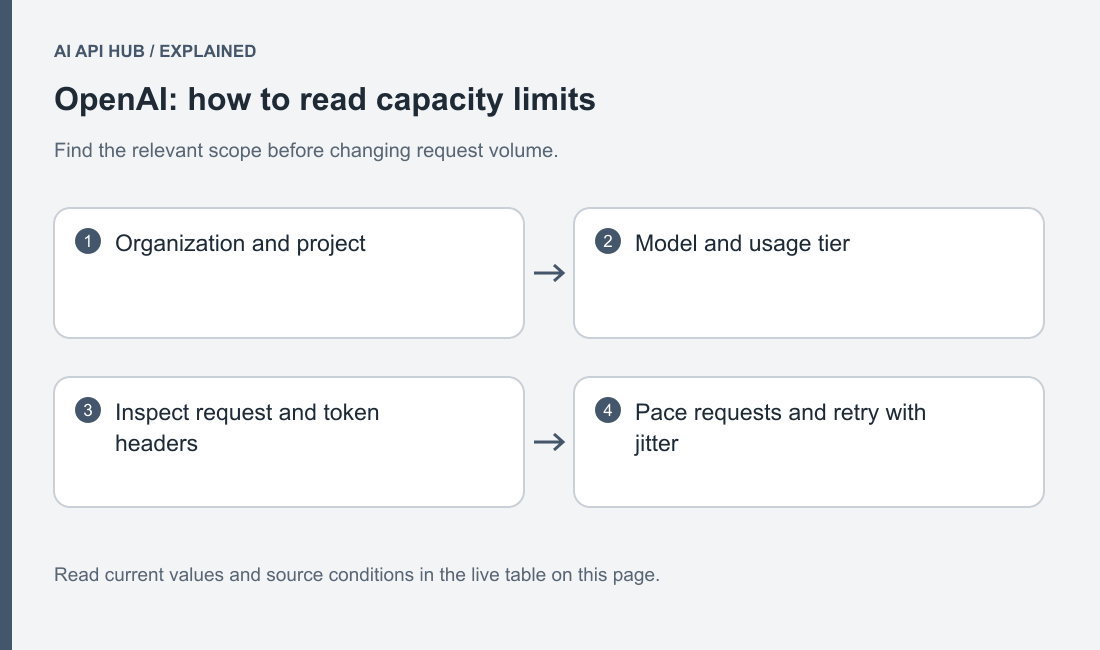
OpenAI applies rate limits at organization and project scope, with model-specific capacity. Approved usage and configurable spending controls are distinct. Official documentation.
Map every background worker to its project. Otherwise independent services can collectively create pressure that no single local log explains.
Inventory the applications sharing a project before tuning their worker counts. Separate interactive replies, document processing and offline evaluation. Record the model used by each class and the expected arrival pattern. Without this map, a team can mistake another service’s traffic for a local performance regression.
Measure accepted completions, waiting time and rejected requests together. More concurrent workers can increase rejection without improving useful throughput. Begin from a controlled baseline and change the queue policy deliberately. Keep the model and request shape fixed while measuring that change so a different generation workload does not obscure the effect of pacing.
Limits by tier and model
Published limits have not yet been verified for this selection. Check the official limits documentation and your account console.
Last verified · Source ↗
Inspect the model and scope attached to each value. A public reference describes documented conditions; the developer dashboard establishes the allocation currently available to the account. Preserve the date of that inspection when planning a deployment. Do not treat another team’s screenshot as a transferable entitlement.
Give each application an explicit behavior when its work cannot be accepted immediately. An interactive response may need a short graceful fallback, while an offline evaluation can remain queued. Make that distinction in the application rather than forcing every workload through the same retry loop. Keep the queue owner and escalation contact visible in the operating record.
How to move up a tier
Inspect the account’s current limits and use the documented increase path. Prepare a description of real workload shape, traffic ramp and completion expectations. Do not promise a tier increase before the provider approves it.
Prepare a capacity request with a workload explanation: selected model, request shape, expected ramp and required completion behavior. Include the pacing the application already performs and how you will monitor the additional traffic. This is more actionable than asking for an unspecified large limit.
Keep the current confirmed allocation as the rollout assumption until the provider or dashboard establishes a change. Do not promise capacity to customers based on an expected approval. If the application cannot meet its requirement under the current allocation, narrow the rollout, adjust the workflow or review a different deployment arrangement while the capacity request is unresolved.
Reading limit headers and 429 responses
The error code can distinguish throttling, traffic acceleration, exhausted credits and spend limits. Follow Retry-After when the applicable error includes it. Official documentation.
Capture the precise code in structured logs instead of grouping every rejected request under a single retry label.
Preserve the specific error code in protected logs. A project spend control, organization usage ceiling and traffic-ramp rejection call for different actions even if the broad response status is similar. Attach the project, model and request identity so the account owner can find the relevant control without receiving the API key.
When rejection increases after a deployment, compare the arrival pattern and retry behavior before blaming the model. A restarted queue can submit accumulated work much faster than normal traffic. Pause the ramp, inspect real responses and resume deliberately. Keep billing repair separate from pacing adjustments so one investigation does not hide the other.
Retry strategy the provider recommends
The provider recommends bounded retries with backoff and jitter for retryable conditions, while billing and quota conditions need account changes. Official documentation.
Choose whether the SDK or the surrounding application owns recovery, then document the combined behavior. A retry limit inside the client and another loop around it can produce more attempts than the operator expects. Give each task an expiry and preserve a final incomplete state when it can no longer serve its purpose.
If the model response may lead to an external action, keep generation recovery separate from action execution. A repeated request must not silently cause a repeated downstream operation. Maintain application task identities and validate the result before marking work complete. Capacity handling is only one part of a reliable workflow; it does not supply the application’s action policy.
Batch/async options that bypass limits
Batch processing uses its own capacity pool and results lifecycle. Check model eligibility and queue limits before moving offline work to it. Official documentation.
Keep batch cost assumptions and account credit conditions attached to the job configuration.
Use the AI API cost calculator to turn the model and workload you are considering into an estimate.
Design an offline batch as a set of traceable input records and later result records. Assign stable identifiers before submission and reconcile the returned items to them. Track failed, missing and accepted results separately so recovery can target unfinished work. Do not blindly resubmit a whole batch when only part of it needs attention.
Check that the selected model and request type are eligible for the batch path. Decide how expiration and partial completion are reported to the operator. A results file is not automatically a successful evaluation; your application still needs to inspect each result against its acceptance criteria. Compare the operational tradeoff with synchronous processing before choosing the lower-rate path.
Last verified · Source ↗
Frequently asked questions
Are limits per end user?
Can traffic growth trigger errors before a nominal limit?
Does batch consume the same capacity pool?
What should a queue do during a billing error?
How do I compare a change in worker concurrency?
Sources
- OpenAI developer quickstart ↗
- OpenAI models ↗
- API pricing ↗
- Rate limits ↗
- Error codes ↗
- Production best practices ↗
- Batch API ↗
- Spend limits ↗
Last verified · Source ↗