Estimate OpenAI API charges from the model, request mode and enabled tools. Keep input, generated output and any additional feature usage separate when comparing an application budget.
How OpenAI pricing works
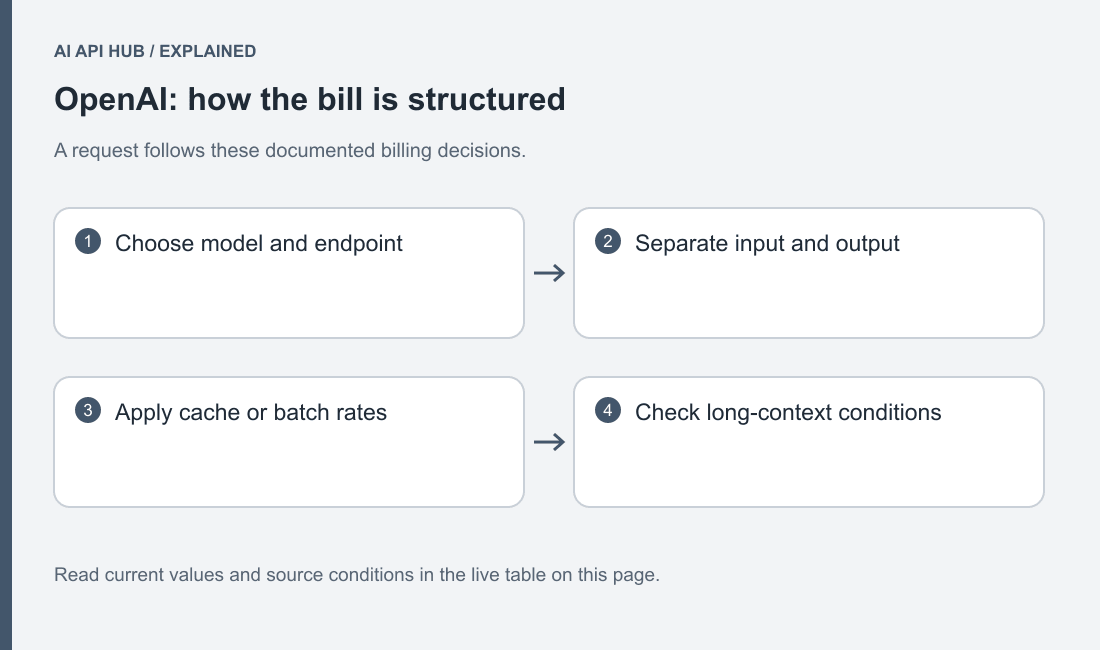
The API pricing reference distinguishes model token rates and additional capabilities. Use the row for the actual model and request mode instead of borrowing the price of a similarly named product. Official documentation.
Start from the complete request: developer instructions, conversation material, retrieved text and tool definitions. Keep a separate estimate for generated output so a long answer does not disappear inside an average input assumption.
Build the estimate around the Responses request your application constructs. Identify the instructions, supplied evidence, conversation material and expected answer separately. If a coding workflow includes a repository excerpt, include that excerpt in the estimate rather than measuring only the short user instruction. If a document workflow asks for structured fields, compare the accepted structured result rather than a loosely related short answer.
Keep a separate line for any hosted capability you enable. The model’s token rate is not a complete description of every possible application bill. Before presenting an estimate to a customer or budget owner, write down what it covers and what remains outside the calculation. This makes an omitted tool or media path visible before it becomes an unexplained difference in the billing view.
Full price list
| Model | Price type | USD | Unit | Tier | Region | Source |
|---|---|---|---|---|---|---|
| gpt-5.6-luna | Batch Input | $0.1 | per 1M tokens | Standard | See source | Official source ↗ |
| gpt-5.6-luna | Batch Input | $0.2 | per 1M tokens | long context | See source | Official source ↗ |
| gpt-5.6-luna | Batch Output | $0.6 | per 1M tokens | Standard | See source | Official source ↗ |
| gpt-5.6-luna | Batch Output | $0.9 | per 1M tokens | long context | See source | Official source ↗ |
| gpt-5.6-luna | Cached Input | $0.02 | per 1M tokens | Standard | See source | Official source ↗ |
| gpt-5.6-luna | Cached Input | $0.04 | per 1M tokens | long context | See source | Official source ↗ |
| gpt-5.6-luna | Input | $0.2 | per 1M tokens | Standard | See source | Official source ↗ |
| gpt-5.6-luna | Input | $0.4 | per 1M tokens | long context | See source | Official source ↗ |
| gpt-5.6-luna | Output | $1.2 | per 1M tokens | Standard | See source | Official source ↗ |
| gpt-5.6-luna | Output | $1.8 | per 1M tokens | long context | See source | Official source ↗ |
| gpt-5.6-sol | Batch Input | $2 | per 1M tokens | Standard | See source | Official source ↗ |
| gpt-5.6-sol | Batch Input | $4 | per 1M tokens | long context | See source | Official source ↗ |
| gpt-5.6-sol | Batch Output | $10 | per 1M tokens | Standard | See source | Official source ↗ |
| gpt-5.6-sol | Batch Output | $15 | per 1M tokens | long context | See source | Official source ↗ |
| gpt-5.6-sol | Cached Input | $0.4 | per 1M tokens | Standard | See source | Official source ↗ |
| gpt-5.6-sol | Cached Input | $0.8 | per 1M tokens | long context | See source | Official source ↗ |
| gpt-5.6-sol | Input | $4 | per 1M tokens | Standard | See source | Official source ↗ |
| gpt-5.6-sol | Input | $8 | per 1M tokens | long context | See source | Official source ↗ |
| gpt-5.6-sol | Output | $20 | per 1M tokens | Standard | See source | Official source ↗ |
| gpt-5.6-sol | Output | $30 | per 1M tokens | long context | See source | Official source ↗ |
| gpt-5.6-terra | Batch Input | $1 | per 1M tokens | Standard | See source | Official source ↗ |
| gpt-5.6-terra | Batch Input | $2 | per 1M tokens | long context | See source | Official source ↗ |
| gpt-5.6-terra | Batch Output | $6 | per 1M tokens | Standard | See source | Official source ↗ |
| gpt-5.6-terra | Batch Output | $9 | per 1M tokens | long context | See source | Official source ↗ |
| gpt-5.6-terra | Cached Input | $0.2 | per 1M tokens | Standard | See source | Official source ↗ |
| gpt-5.6-terra | Cached Input | $0.4 | per 1M tokens | long context | See source | Official source ↗ |
| gpt-5.6-terra | Input | $2 | per 1M tokens | Standard | See source | Official source ↗ |
| gpt-5.6-terra | Input | $4 | per 1M tokens | long context | See source | Official source ↗ |
| gpt-5.6-terra | Output | $12 | per 1M tokens | Standard | See source | Official source ↗ |
| gpt-5.6-terra | Output | $18 | per 1M tokens | long context | See source | Official source ↗ |
| gpt-6-astra | Batch Input | $5 | per 1M tokens | Standard | See source | Official source ↗ |
| gpt-6-astra | Batch Input | $10 | per 1M tokens | long context | See source | Official source ↗ |
| gpt-6-astra | Batch Output | $25 | per 1M tokens | Standard | See source | Official source ↗ |
| gpt-6-astra | Batch Output | $37.5 | per 1M tokens | long context | See source | Official source ↗ |
| gpt-6-astra | Cached Input | $1 | per 1M tokens | Standard | See source | Official source ↗ |
| gpt-6-astra | Cached Input | $2 | per 1M tokens | long context | See source | Official source ↗ |
| gpt-6-astra | Input | $10 | per 1M tokens | Standard | See source | Official source ↗ |
| gpt-6-astra | Input | $20 | per 1M tokens | long context | See source | Official source ↗ |
| gpt-6-astra | Output | $50 | per 1M tokens | Standard | See source | Official source ↗ |
| gpt-6-astra | Output | $75 | per 1M tokens | long context | See source | Official source ↗ |
Last verified · Source ↗
Select the exact model identifier, then inspect the price type and any processing-mode qualifier. A remembered price for another model generation is not a valid substitute. When a record has no verified amount for a requested feature, leave the estimate incomplete until the official source establishes the fact. Do not convert an unknown field into a free feature merely because the table cell is empty.
Use the source page to examine qualifications that matter to your request. Keep the comparison dated and preserve the model selection with it. If another team uses a negotiated arrangement or a different product, keep their figure separate from the public API table. The useful question is what this application’s selected request path will cost under its actual account arrangement.
Estimate your cost
Estimate your API costs
Your text and estimates stay in this browser. No API requests are sent to model providers.
Loading verified model records…
Use the OpenAI workload calculator for a reusable comparison.
Enter a measured request when you have one, and identify assumptions when you do not. Keep a compact-answer case and a detailed-answer case separate. For a workflow that often rejects an initial result, include the additional work needed to obtain an accepted outcome. A cheap unsuccessful answer can make the model look attractive while increasing the effort required to finish the task.
Run a sensitivity comparison before adopting the forecast. Hold the request shape fixed and change the model. Then restore the model and change the expected response length. Finally vary the amount of repeated context. Save those scenarios with their purpose, so the budget owner can see which assumption has the strongest practical effect and which assumption still requires measurement.
Three worked scenarios
- Chatbot: compare a concise reply with a detailed answer while leaving the incoming message fixed.
- Summarization: estimate short extracts separately from a narrative that revisits every section.
- Coding assistant: include repository context and the output patch rather than only the user’s instruction.
Estimate your API costs
Your text and estimates stay in this browser. No API requests are sent to model providers.
Loading verified model records…
Estimate your API costs
Your text and estimates stay in this browser. No API requests are sent to model providers.
Loading verified model records…
Estimate your API costs
Your text and estimates stay in this browser. No API requests are sent to model providers.
Loading verified model records…
For a support chatbot, construct fixtures with the same final question but different relevant histories. Judge whether retaining additional history changes the accepted answer. If it does not, consider whether the application should select context more carefully before evaluating a different model. Keep escalation and uncertainty as valid outcomes where the evidence is incomplete.
For summarization, decide whether the result must preserve decisions, dates, owners or disputed claims. Compare outputs that meet that definition; a shorter result that drops the requested evidence is not an equivalent workload. For a coding assistant, evaluate the patch in the actual repository and count the work needed to repair rejected output. The model’s own statement that the code is correct is not a substitute for the project checks.
How to reduce cost on OpenAI
The Batch API serves asynchronous workloads and has documented model eligibility. Use it when a job can wait for a results file. Official documentation.
Keep evaluation quality fixed while trying a less costly candidate. Remove repeated irrelevant context, measure the resulting usage and check that the answer still satisfies the task.
Treat optimization as an experiment with a fixed acceptance bar. Save the original request and a set of expected properties, then change one part of the pipeline. You might remove irrelevant context, request a narrower output or route a routine task to another model. Measure accepted task completion alongside returned usage. Keep the change only if it improves the application’s actual objective.
For offline evaluations, batch processing also changes how the job is operated. Give input records stable identifiers, reconcile returned items and separate completed work from retryable failures. Do not use an asynchronous path for an interaction that requires an immediate response merely because its listed rate is lower. The lifecycle must fit the application before a pricing comparison is meaningful.
Billing, credits and limits notes
Spend alerts and enforced spending controls serve different purposes. Read the current behavior before deciding which control protects the application. Official documentation.
Inspect account offers and capacity limits alongside pricing.
Choose spending controls as a product decision. An enforced stop can be appropriate for an experiment, while a live service needs a clear customer-facing state when its configured cap is reached. Decide who can change the control, how the owner is notified and which jobs should remain paused until the account condition is resolved. Keep an alert and an enforced limit distinct in that operating note.
Reconcile the forecast after the application has representative usage. Compare the selected models, accepted completions and optional features against the original assumptions. If the forecast was wrong, identify the changed assumption rather than adjusting the total without an explanation. A useful cost report tells the next operator what was measured and what was estimated.
Price change history
- OpenAI · gpt-live-1 — Amount UsdNot previously recorded → Price category: per_minute · USD: 0.05 · Unit: per minuteSource ↗
- OpenAI · gpt-live-1 — MetadataModalities: ["text"] → Modalities: ["audio-in","audio-out"]Source ↗
- OpenAI · babbage-002 — Amount UsdNot previously recorded → Price category: batch_output · USD: 0.2 · Unit: per 1M tokensSource ↗
- OpenAI · babbage-002 — Amount UsdNot previously recorded → Price category: batch_input · USD: 0.2 · Unit: per 1M tokensSource ↗
- OpenAI · babbage-002 — Amount UsdNot previously recorded → Price category: output · USD: 0.4 · Unit: per 1M tokensSource ↗
- OpenAI · babbage-002 — Amount UsdNot previously recorded → Price category: input · USD: 0.4 · Unit: per 1M tokensSource ↗
- OpenAI · davinci-002 — Amount UsdNot previously recorded → Price category: batch_output · USD: 1 · Unit: per 1M tokensSource ↗
- OpenAI · davinci-002 — Amount UsdNot previously recorded → Price category: batch_input · USD: 1 · Unit: per 1M tokensSource ↗
- OpenAI · davinci-002 — Amount UsdNot previously recorded → Price category: output · USD: 2 · Unit: per 1M tokensSource ↗
- OpenAI · davinci-002 — Amount UsdNot previously recorded → Price category: input · USD: 2 · Unit: per 1M tokensSource ↗
- OpenAI · gpt-3.5-turbo-instruct — Amount UsdNot previously recorded → Price category: output · USD: 2 · Unit: per 1M tokensSource ↗
- OpenAI · gpt-3.5-turbo-instruct — Amount UsdNot previously recorded → Price category: input · USD: 1.5 · Unit: per 1M tokensSource ↗
When a recorded price changes, rerun the same saved workload assumptions before drawing a conclusion. Explain which model and charge category changed, then identify the application paths affected. A broad announcement that an API is cheaper may not apply to the endpoint or workload your team uses.
Keep a dated decision record if the change leads to a model migration. Test quality and request compatibility again, even if cost triggered the review. When official evidence and a displayed value disagree, submit the exact row and source link for correction. Do not use a disputed figure in a customer quote while waiting for the discrepancy to be resolved.
Last verified · Source ↗
Frequently asked questions
Is API pricing the same as another OpenAI product plan?
Can I budget all models with one token rate?
Does a batch request use the ordinary synchronous path?
Will a spend alert necessarily stop requests?
What should I measure after deployment?
Sources
- OpenAI developer quickstart ↗
- OpenAI models ↗
- API pricing ↗
- Rate limits ↗
- Error codes ↗
- Production best practices ↗
- Batch API ↗
- Spend limits ↗
Last verified · Source ↗