Read DeepSeek charges by token category and the condition attached to each rate. Use your own workload in the live calculator before deciding how to schedule or optimize requests.
How DeepSeek pricing works
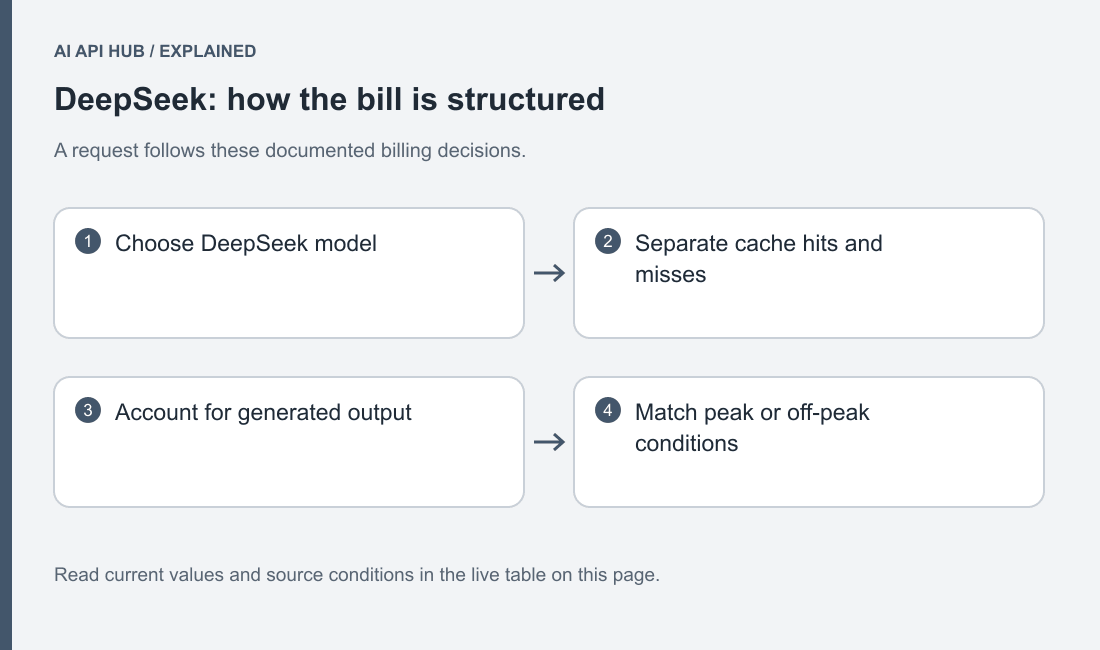
The official price reference separates cache-hit input, cache-miss input and generated output, with peak and off-peak conditions. The live rows below keep those categories distinct. A discounted input rate applies only to the input actually reported in that category; it is not a discount on every token in the request. Official DeepSeek documentation.
Build the estimate from the request you will send. A conversation includes the history your application resubmits, a coding assistant includes relevant source and tool results, and document work includes the supplied text. Write down the expected answer shape separately. A concise classification and a long explanation can have similar input but very different output usage.
For planning, treat uncertain reuse conservatively. If you have not measured cache hits in a representative run, begin with uncached input assumptions. Save a second estimate using measured reuse when you have evidence. This gives you an ordinary case and a sensitivity check without presenting an optimistic cache ratio as a guaranteed property of the service.
Full price list
| Model | Price type | USD | Unit | Tier | Region | Source |
|---|---|---|---|---|---|---|
| deepseek-flash | Cached Input | $0.003 | per 1M tokens | off-peak | See source | Official source ↗ |
| deepseek-flash | Cached Input | $0.006 | per 1M tokens | peak | See source | Official source ↗ |
| deepseek-flash | Input | $0.15 | per 1M tokens | off-peak | See source | Official source ↗ |
| deepseek-flash | Input | $0.3 | per 1M tokens | peak | See source | Official source ↗ |
| deepseek-flash | Output | $0.6 | per 1M tokens | off-peak | See source | Official source ↗ |
| deepseek-flash | Output | $1.2 | per 1M tokens | peak | See source | Official source ↗ |
| deepseek-v4-pro | Cached Input | $0.022 | per 1M tokens | off-peak | See source | Official source ↗ |
| deepseek-v4-pro | Cached Input | $0.044 | per 1M tokens | peak | See source | Official source ↗ |
| deepseek-v4-pro | Input | $0.66 | per 1M tokens | off-peak | See source | Official source ↗ |
| deepseek-v4-pro | Input | $1.32 | per 1M tokens | peak | See source | Official source ↗ |
| deepseek-v4-pro | Output | $1.98 | per 1M tokens | off-peak | See source | Official source ↗ |
| deepseek-v4-pro | Output | $3.96 | per 1M tokens | peak | See source | Official source ↗ |
Last verified · Source ↗
Read the rate label and source link alongside the amount. Historical DeepSeek V3.2 searches may lead to articles about a retired generation; they do not establish the current price of a request served by today’s identifier. Use DeepSeek naming and replacements to connect the requested name to its current official documentation.
The table is useful for comparison only when the units and conditions match. Keep cached input separate from ordinary input and peak separate from off-peak. If a condition is missing from your usage record, do not silently select the cheapest row. Check the official billing reference or preserve that uncertainty in the estimate.
Estimate your cost
Estimate your API costs
Your text and estimates stay in this browser. No API requests are sent to model providers.
Loading verified model records…
Open the AI API cost calculator for a shareable estimate using the same request assumptions. Enter representative input and output, then vary request volume. Keep any conditional discount in a separate scenario unless your scheduler and actual billing evidence establish that it applies.
After an experiment, compare the account’s usage record with the estimate rather than editing the estimate until it looks right. Check whether the application resent long history, retried a completed request, changed mode or requested a longer answer than expected. Those differences explain how the workload changed and are more useful than a single monthly total.
Three worked scenarios
For a chatbot, start from an ordinary user question and the history your product retains. Use the calculator’s input field for that full message set and its output field for the intended answer shape. Then model a longer conversation separately. If the later turns dominate cost, test a history policy that retains decisions and relevant facts while dropping repeated explanation. Verify that the shortened history still resolves follow-up references correctly.
For summarization, use a representative document and an explicit summary structure. Include difficult examples with repeated passages and missing information. Compare direct summarization with selecting relevant sections first, accounting for any additional model calls in the latter workflow. A shorter final answer does not make a preprocessing step free. Keep the quality criterion fixed so an apparent saving is not simply a less complete answer.
For a coding assistant, count the source excerpt, instructions and tool results used across the entire task. Measure the accepted patch, not just the first completion. A promising suggestion that requires several correction turns can cost more than a useful answer with a higher unit rate. Use a failing test or a review checklist as the acceptance criterion and record the whole sequence in your workload estimate.
How to reduce cost on DeepSeek
DeepSeek’s cache mechanism reuses eligible persisted prefixes and reports cache-hit and cache-miss input usage. The provider describes this as best effort rather than a guaranteed hit rate. Stable shared material and changing questions therefore deserve a measured experiment, not an assumed discount. Official DeepSeek documentation.
Place reusable material consistently and keep volatile identifiers out of a shared prefix when the task permits it. Test with safe repeated input, inspect the returned cache fields, and compare results after changing the prompt layout. Do not add irrelevant text merely to make requests look similar. A cache-friendly structure is useful only if it also preserves the task’s accuracy and privacy boundaries.
Reduce avoidable output by asking for the artifact your application consumes. For a label, request a label with the required supporting fields; for a patch, define the expected patch format and validation. Set a suitable output ceiling, then handle truncation explicitly. Evaluate thinking settings on actual tasks rather than assuming the same configuration is economical for a trivial extraction and a difficult code repair.
Deferrable work can be evaluated against the official off-peak schedule, which is published with UTC conditions. Retain the applicable billing condition in the job record. A delayed job that crosses into a different period needs to be assessed under the condition that actually applied; your original enqueue time is not enough evidence of the final charge. Official DeepSeek documentation.
Billing, credits and limits notes
The billing reference distinguishes purchased and granted balances. Check the account directly for any grant’s applicability; the existence of a granted-balance concept does not mean every new user receives an allowance. Read DeepSeek grants and free access before promising a free experience to your own users. Official DeepSeek documentation.
A spending plan and an admission limit solve different problems. The former controls what you can afford; the latter controls how much work the service accepts concurrently. Review DeepSeek concurrency limits when adding workers. Keep a stop condition in your application so a large queue cannot continue consuming the account after the experiment’s purpose has been fulfilled.
Price change history
- DeepSeek · deepseek-v4-pro — MetadataRecord updated; consult the linked source for details. → Record updated; consult the linked source for details.Source ↗
- DeepSeek · deepseek-flash — MetadataModalities: ["text"] → Modalities: ["text","image"]Source ↗
- DeepSeek · deepseek-v4-pro — ValueNot previously recorded → Tier: account default · Metric: concurrency · Value: 500 · Notes: Account-wide active requests per model; not a requests-per-minute quota.Source ↗
- DeepSeek · deepseek-flash — ValueNot previously recorded → Tier: account default · Metric: concurrency · Value: 2500 · Notes: Account-wide active requests per model; not a requests-per-minute quota.Source ↗
- DeepSeek · deepseek-v4-pro — Amount UsdNot previously recorded → Price category: output · USD: 3.96 · Unit: per 1M tokens · Tier: peakSource ↗
- DeepSeek · deepseek-v4-pro — Amount UsdNot previously recorded → Price category: output · USD: 1.98 · Unit: per 1M tokens · Tier: off-peakSource ↗
- DeepSeek · deepseek-v4-pro — Amount UsdNot previously recorded → Price category: input · USD: 1.32 · Unit: per 1M tokens · Tier: peakSource ↗
- DeepSeek · deepseek-v4-pro — Amount UsdNot previously recorded → Price category: input · USD: 0.66 · Unit: per 1M tokens · Tier: off-peakSource ↗
- DeepSeek · deepseek-v4-pro — Amount UsdNot previously recorded → Price category: cached_input · USD: 0.044 · Unit: per 1M tokens · Tier: peakSource ↗
- DeepSeek · deepseek-v4-pro — Amount UsdNot previously recorded → Price category: cached_input · USD: 0.022 · Unit: per 1M tokens · Tier: off-peakSource ↗
When a price condition changes, preserve the earlier estimate with its date and assumptions. Recalculate future work from the new live table and investigate already billed work using the account’s actual usage record. The history records observed published changes; it is not an invoice and cannot reconstruct private cache usage or account-specific adjustments.
Frequently asked questions
Is the advertised input rate the whole request cost?
Can I use an old V3.2 article for current budgeting?
Does a repeated prompt guarantee a cache hit?
Does thinking always cost less overall?
Is off-peak pricing a batch API?
Why can the invoice differ from the calculator?
Sources
Last verified · Source ↗