Plan Claude API traffic around the organization and workspace that own the requests. Diagnose capacity pressure separately from spending controls before adding retries or more workers.
How Anthropic limits work
Claude distinguishes spending controls from rate controls, with organization-level limits and optional workspace restrictions. Request, input-token and output-token capacity are separate dimensions. Official documentation.
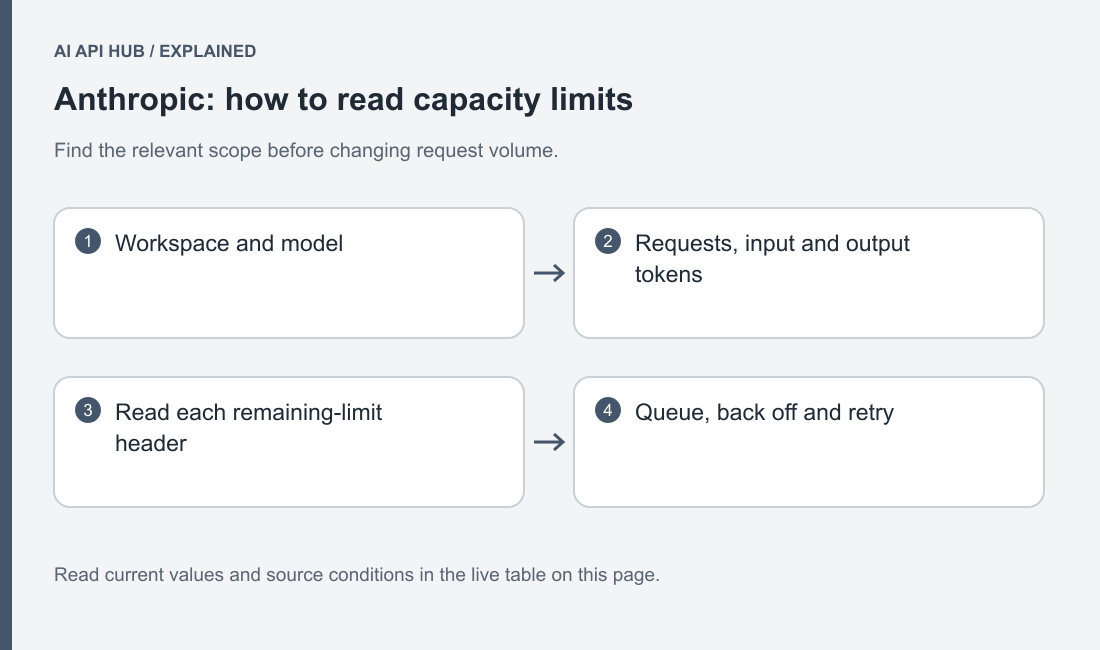
Design your queue around the constrained dimension. A burst of tiny requests and a few long generations can pressure different parts of the same account.
Translate the application into a workload before choosing a worker count. Identify short interactive requests, document-heavy requests and long generated answers separately. Attach each class to its organization and workspace. When a shared application becomes busy, this record helps explain whether one workload is consuming the capacity another needs.
Measure completed useful work alongside rejected requests and queue age. Increasing concurrency may move waiting from your application into repeated rejection without improving the user experience. Begin with controlled traffic and change one queue policy at a time. Keep the model and request shape fixed during that experiment so the effect of pacing remains interpretable.
Limits by tier and model
| Model or scope | Tier | Metric | Limit | Notes | Source |
|---|---|---|---|---|---|
Claude Haiku 4.5claude-haiku-4-5-20251001 | published default | RPM | 1,000 | Input and output token limits are separate in the official table; account settings prevail. | Official source ↗ |
Claude Opus 5claude-opus-5 | published default | RPM | 1,000 | Input and output token limits are separate in the official table; account settings prevail. | Official source ↗ |
Claude Sonnet 5claude-sonnet-5 | published default | RPM | 1,000 | Input and output token limits are separate in the official table; account settings prevail. | Official source ↗ |
Last verified · Source ↗
Match the table to the actual account tier and model class. A standard documented maximum is not a guarantee that every account currently has that allocation. Use the console’s current view when investigating an account-specific condition and record when you checked it. Keep unpublished values unresolved instead of filling the table with another organization’s screenshot.
When planning a shared service, document which application owns each queue and how it should behave if capacity is temporarily unavailable. A high-priority interactive request and a background evaluation should not compete accidentally. Decide the application’s scheduling policy explicitly and test it with representative request shapes before expanding traffic.
How to move up a tier
Use the console’s current rate-limit view and the provider’s documented increase path. Account history and standing affect the tier available to an organization. Official documentation.
Collect realistic request shape, peak arrival pattern and expected processing time before requesting capacity. This is more useful than asking for a large undifferentiated limit.
Prepare an increase request that describes the work rather than only the desired ceiling. Include the selected model class, the shape of the requests, the expected arrival pattern and the completion requirement. Explain what pacing the application already performs and how you will monitor the change. This gives the account owner a practical basis for deciding whether more capacity is justified.
Do not promise customers that an upgrade is automatic or already available. Keep the current verified allocation as the operating assumption until the console or provider confirms the new one. If the application cannot meet its requirement under current conditions, narrow the rollout or change the workflow instead of hiding the gap behind optimistic retry logic.
Reading limit headers and 429 responses
Claude supplies a retry-after header when rate capacity is exceeded. Rapid acceleration can also trigger rate pressure. Official documentation.
Record the error type and relevant headers with the request identifier. Avoid merging every capacity problem into a generic application timeout.
Store rate diagnostics separately from sensitive prompt contents. Keep the provider error type, available retry timing, model, workspace and your application’s request identifier. Record the queue state at the time of failure. This lets you distinguish a steady workload that needs more capacity from a sudden burst caused by a deployment or a restarted scheduled job.
When an incident starts, pause the traffic ramp and inspect a sample of real responses. Avoid turning every error into the same message in your monitoring system. If account spending is the relevant condition, changing queue pacing will not repair it. If temporary capacity is the issue, repeatedly reloading credentials only adds confusion.
Retry strategy the provider recommends
Official SDKs retry certain transient failures and can be configured. Avoid layering an unbounded application retry loop over SDK retries. Official documentation.
Give a queued request an expiry time and return a clear application state if it cannot finish in time.
Choose one place to own the retry budget. If the SDK performs retries, understand that behavior before adding another loop around the same request. Give the application a deadline, a maximum recovery effort and a clear outcome when the work remains incomplete. Keep a failed request available for diagnosis without repeatedly sending it after its useful lifetime has passed.
For operations that may later trigger external actions, keep request recovery separate from action execution. A model request can be retried without granting permission to duplicate a downstream operation. Preserve the application’s task identity and only mark work complete when the result has passed your own validation. This is an application design decision, not something a provider capacity limit resolves for you.
Batch/async options that bypass limits
Message Batches provides asynchronous processing with its own documented workflow. Treat it as separate capacity planning, not permission to ignore account controls. Official documentation.
Review batch and cache charge categories and available account offers before moving a job.
Use the AI API cost calculator to turn the model and workload you are considering into an estimate.
Consider batches when the workflow can be organized as input records and later result records. Prepare a stable identifier for each item before submission. When results arrive, reconcile them to those identifiers and inspect their individual outcomes. Keep missing, failed and accepted items distinct so the recovery process can target the unfinished work.
Do not move a customer-facing interaction to a batch workflow simply to make a capacity chart look better. The completion model must fit what the customer expects. A nightly evaluation or offline document job can often tolerate a different lifecycle than an interactive assistant. Document that tradeoff, then compare the actual cost and capacity behavior with the synchronous baseline.
Last verified · Source ↗
Frequently asked questions
Are limits attached only to an API key?
Why can a sudden burst fail?
Does retrying fix an invalid request?
Can I use batches for interactive replies?
What should I send with a capacity request?
Sources
- Claude API overview ↗
- Get started with Claude ↗
- Models overview ↗
- Claude pricing ↗
- Rate limits ↗
- API errors ↗
- Prompt caching ↗
- Batch processing ↗
Last verified · Source ↗