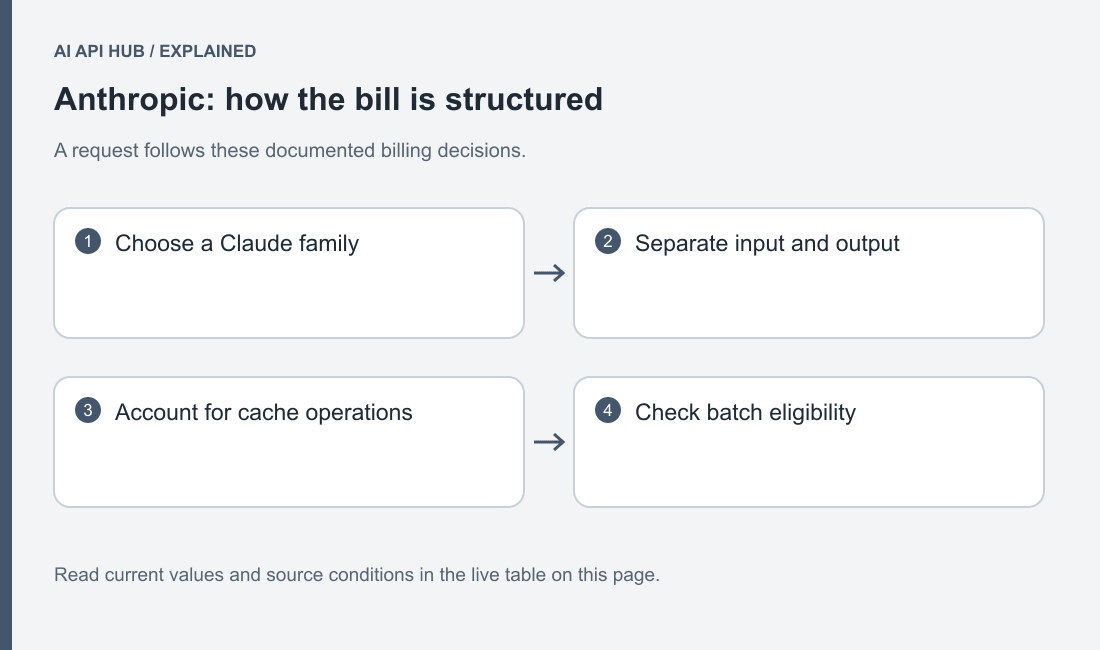
Estimate Claude API spending by separating request input, response output and repeated prompt material. Use the live price table to choose the matching model and billing category.
How Anthropic pricing works
Claude billing distinguishes base input, output, cache creation and cache reads. Some server-side tools add charges beyond the model’s token bill. Official documentation.
Start with a workload sketch: the reusable instruction, the changing user material and the response you want. Mark which portion stays identical between requests. Do not treat the entire prompt as cached merely because your application repeats its purpose.
For a Claude document assistant, build the estimate from the actual request you intend to ship. Put the reusable application instructions in one group, the current document in another, and the question in another. Keep the response separate. This worksheet lets you explain why costs change when a customer uploads a longer document or asks for a detailed answer. It also prevents an apparently precise monthly total from hiding an unspecified conversation length.
Record whether the application is calling Anthropic directly or another platform that hosts Claude. Use the corresponding source and account when reconciling usage. If a team member forwards a cheaper figure from a different deployment, treat that as a new pricing arrangement to investigate. Do not overwrite the direct-API estimate merely because the model display name looks identical.
Full price list
| Model | Price type | USD | Unit | Tier | Region | Source |
|---|---|---|---|---|---|---|
| Claude Fable 5.1 | Cached Input | $0.25 | per 1M tokens | Standard | See source | Official source ↗ |
| Claude Fable 5.1 | Input | $10 | per 1M tokens | Standard | See source | Official source ↗ |
| Claude Fable 5.1 | Output | $50 | per 1M tokens | Standard | See source | Official source ↗ |
| Claude Haiku 4.5 | Cached Input | $0.1 | per 1M tokens | Standard | See source | Official source ↗ |
| Claude Haiku 4.5 | Input | $1 | per 1M tokens | Standard | See source | Official source ↗ |
| Claude Haiku 4.5 | Output | $5 | per 1M tokens | Standard | See source | Official source ↗ |
| Claude Opus 5 | Cached Input | $0.5 | per 1M tokens | Standard | See source | Official source ↗ |
| Claude Opus 5 | Input | $5 | per 1M tokens | Standard | See source | Official source ↗ |
| Claude Opus 5 | Output | $25 | per 1M tokens | Standard | See source | Official source ↗ |
| Claude Sonnet 5 | Cached Input | $0.2 | per 1M tokens | Standard | See source | Official source ↗ |
| Claude Sonnet 5 | Input | $2 | per 1M tokens | Standard | See source | Official source ↗ |
| Claude Sonnet 5 | Output | $10 | per 1M tokens | Standard | See source | Official source ↗ |
Last verified · Source ↗
Read the model identifier before reading the amount. A family can contain multiple generations, and a saved deployment may still be using an older identifier. Next inspect the price type and any qualifying tier. Keep an unavailable value distinct from a free value: a blank field means this site lacks the required verified fact, not that the provider has waived the charge.
Use the source link to inspect footnotes that matter to your request. If your application enables a specialized feature, confirm whether its charges appear in this table or need a separate line in your budget. Record the date you made the comparison, then revisit it after a published change rather than continually comparing against an undated screenshot.
Estimate your cost
Estimate your API costs
Your text and estimates stay in this browser. No API requests are sent to model providers.
Loading verified model records…
Open the full workload calculator to retain alternative assumptions.
Start with an uncached estimate so you have a baseline you can explain. Enter input from a representative request and output from a response you would accept. If you have not run the workflow, maintain a conservative and an optimistic scenario instead of presenting a guess as an observed average. The calculator is a planning tool; your acceptance criteria determine whether a cheaper result is useful.
Then vary one assumption at a time. Keep the model fixed while changing response length. Keep the request shape fixed while comparing a different candidate. Keep the traffic forecast fixed while changing the proportion of repeated material. Save the assumptions alongside the result so a colleague can reproduce the comparison and identify which assumption would invalidate it.
Three worked scenarios
- Chatbot: compare a short conversation against an accumulated conversation; vary returned answer length independently.
- Summarization: keep document input fixed and compare brief extraction against a detailed narrative.
- Coding assistant: separate the repeated repository instructions from the changing diff and tool results.
Estimate your API costs
Your text and estimates stay in this browser. No API requests are sent to model providers.
Loading verified model records…
Estimate your API costs
Your text and estimates stay in this browser. No API requests are sent to model providers.
Loading verified model records…
Estimate your API costs
Your text and estimates stay in this browser. No API requests are sent to model providers.
Loading verified model records…
For the chatbot scenario, prepare a fresh conversation and a conversation that has accumulated relevant history. Give both the same final question. Compare the quality of the answer as well as the token breakdown. If the long conversation adds cost without adding useful context, the application may need a history-selection policy before it needs a different model.
For summarization, define what a successful summary preserves: decisions, unresolved questions, attribution or a list of requested facts. A shorter answer is not a saving if the application must make another request to recover essential information. For a coding assistant, compare a focused diff request with a broad repository question. Check the resulting patch and explanation; do not treat a model’s assertion that a change works as a successful evaluation.
How to reduce cost on Anthropic
Prompt caching can reuse matching prompt material; batch processing is a separate asynchronous path for work that can wait. Official documentation.
Use the batch result workflow for offline evaluation or document processing, and inspect individual result outcomes before marking the job complete. Official documentation.
Evaluate a smaller candidate on the same saved tasks before routing routine requests to it. A lower quoted rate is only helpful if the response still meets the acceptance criteria.
A practical cache experiment needs a stable repeated portion of the request. Write down exactly which text must remain identical and which part changes for each user. If your application injects a changing timestamp or rearranges the prompt on every call, investigate whether that undermines the intended cache behavior before projecting savings. Inspect returned usage rather than inferring a hit from a fast response.
For offline work, compare batch processing as an operational design, not merely a discounted amount. Decide how jobs are submitted, how their results are matched to your records and what happens when an individual result fails. Keep a retryable item separate from an already accepted result so recovery does not accidentally repeat completed work. The batch guide describes the provider workflow; your application still needs an accountable result ledger.
Billing, credits and limits notes
Review the current credit and free-tier evidence and workspace and organization limits together. Set an application budget before scheduling unattended jobs.
Bring the billing owner into the estimate before making it an operating budget. Show the model, request pattern, cache assumption and feature exclusions. Distinguish the application’s intended budget from the account controls available in the console. Write down who can change those controls and what message users should see when the application deliberately pauses.
Review a trial or granted balance as a temporary funding source. Do not subtract it from every future month in a forecast. If the prototype is successful, produce a paid continuation estimate using the same workload assumptions and the current verified rates. If it is unsuccessful, stop the scheduled work and retire its credential so the account does not continue funding an abandoned experiment.
Price change history
- Anthropic · Claude Haiku 4.5 — MetadataRecord updated; consult the linked source for details. → Record updated; consult the linked source for details.Source ↗
- Anthropic · Claude Sonnet 5 — MetadataRecord updated; consult the linked source for details. → Record updated; consult the linked source for details.Source ↗
- Anthropic · Claude Opus 5 — MetadataRecord updated; consult the linked source for details. → Record updated; consult the linked source for details.Source ↗
- Anthropic · Claude Fable 5.1 — MetadataRecord updated; consult the linked source for details. → Record updated; consult the linked source for details.Source ↗
- Anthropic · Claude Haiku 4.5 — ValueNot previously recorded → Tier: published default · Metric: RPM · Value: 1000 · Notes: Input and output token limits are separate in the official table; account settings prevail.Source ↗
- Anthropic · Claude Haiku 4.5 — MetadataRecord updated; consult the linked source for details. → Record updated; consult the linked source for details.Source ↗
- Anthropic · Claude Sonnet 5 — MetadataRecord updated; consult the linked source for details. → Record updated; consult the linked source for details.Source ↗
- Anthropic · Claude Opus 5 — MetadataRecord updated; consult the linked source for details. → Record updated; consult the linked source for details.Source ↗
- Anthropic · Claude Fable 5.1 — MetadataRecord updated; consult the linked source for details. → Record updated; consult the linked source for details.Source ↗
- Anthropic · Claude Haiku 4.5 — MetadataRecord updated; consult the linked source for details. → Record updated; consult the linked source for details.Source ↗
- Anthropic · Claude Sonnet 5 — MetadataRecord updated; consult the linked source for details. → Record updated; consult the linked source for details.Source ↗
- Anthropic · Claude Opus 5 — MetadataRecord updated; consult the linked source for details. → Record updated; consult the linked source for details.Source ↗
When a price changes, preserve the model and request assumptions that produced your previous estimate. Recalculate the same workload under the new live values, then explain the difference in terms of the affected charge category. This is more useful than announcing that a provider became cheaper while omitting which model or operation changed.
An entry in the history is evidence about a recorded data change, not a prediction about your invoice. Account agreements, enabled features and workload changes may still matter. If the source appears inconsistent, send a correction with the exact model, row and official link. Keep disputed values out of a customer-facing quote until the discrepancy is resolved.
Last verified · Source ↗
Frequently asked questions
Are cache writes the same as cache reads?
Does every request qualify for batch pricing?
Should I budget only visible answer text?
Can another platform’s Claude price be substituted?
How should I estimate a repeated document workflow?
Sources
- Claude API overview ↗
- Get started with Claude ↗
- Models overview ↗
- Claude pricing ↗
- Rate limits ↗
- API errors ↗
- Prompt caching ↗
- Batch processing ↗
Last verified · Source ↗