Plan Kimi API traffic around shared organization capacity and the actual reason a call is rejected. Separate pacing, account balance and temporary service pressure before changing worker behavior.
How Moonshot limits work
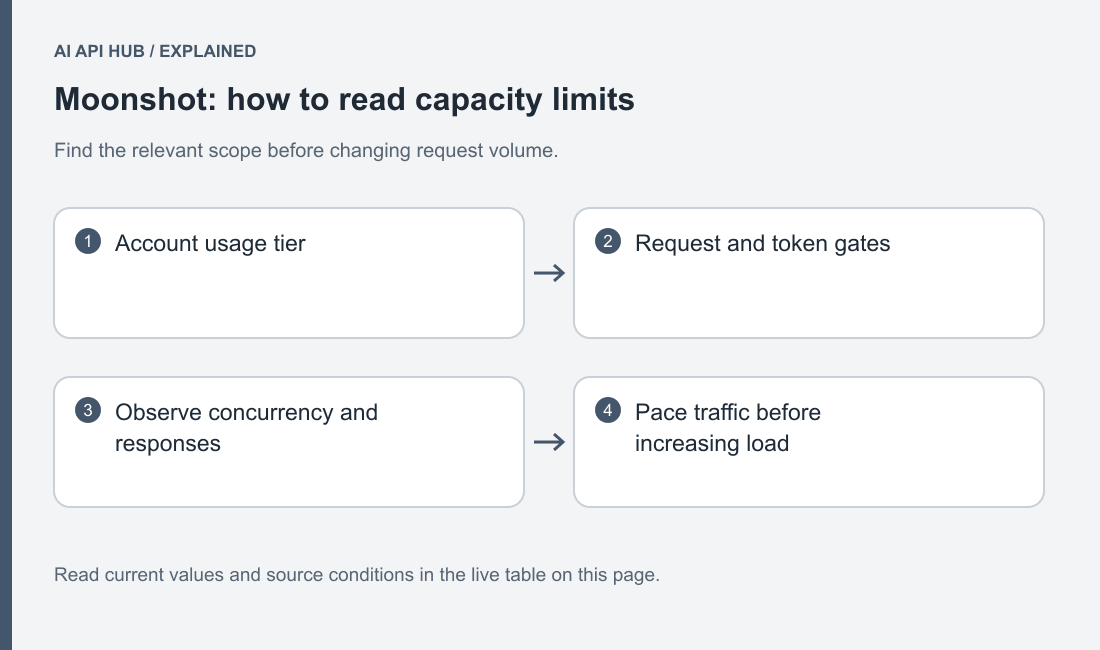
Kimi documents concurrency, request and token metrics, with account tiers based on accumulated recharge. Official documentation.
Map all producers of traffic before choosing a worker count. Interactive requests, document jobs and coding loops can share resources while appearing in different application logs. A local service that looks quiet may still be competing with another project. Keep organization and project identity in operational metadata without logging secrets.
Treat concurrency and throughput as different controls. A long request occupies an active slot for its duration, while a burst of small requests creates a different pattern. Measure accepted completions, waiting time and rejected work together. Raising parallelism can increase contention without improving the number of useful tasks completed.
Projects share organization balance and rate limits, while a project can also have its own configured throughput boundary. Official documentation.
Limits by tier and model
| Model or scope | Tier | Metric | Limit | Notes | Source |
|---|---|---|---|---|---|
| All models (provider scope) | Tier0 | concurrency | 1 | Published account tier. Unlimited quotas are not converted into a numeric cap. | Official source ↗ |
| All models (provider scope) | Tier0 | RPM | 3 | Published account tier. Unlimited quotas are not converted into a numeric cap. | Official source ↗ |
| All models (provider scope) | Tier0 | TPD | 1,500,000 | Published account tier. Unlimited quotas are not converted into a numeric cap. | Official source ↗ |
| All models (provider scope) | Tier0 | TPM | 500,000 | Published account tier. Unlimited quotas are not converted into a numeric cap. | Official source ↗ |
| All models (provider scope) | Tier1 | concurrency | 15 | Published account tier. Unlimited quotas are not converted into a numeric cap. | Official source ↗ |
| All models (provider scope) | Tier1 | RPM | 100 | Published account tier. Unlimited quotas are not converted into a numeric cap. | Official source ↗ |
| All models (provider scope) | Tier1 | TPM | 2,000,000 | Published account tier. Unlimited quotas are not converted into a numeric cap. | Official source ↗ |
| All models (provider scope) | Tier2 | concurrency | 40 | Published account tier. Unlimited quotas are not converted into a numeric cap. | Official source ↗ |
| All models (provider scope) | Tier2 | RPM | 100 | Published account tier. Unlimited quotas are not converted into a numeric cap. | Official source ↗ |
| All models (provider scope) | Tier2 | TPM | 3,000,000 | Published account tier. Unlimited quotas are not converted into a numeric cap. | Official source ↗ |
| All models (provider scope) | Tier3 | concurrency | 50 | Published account tier. Unlimited quotas are not converted into a numeric cap. | Official source ↗ |
| All models (provider scope) | Tier3 | RPM | 200 | Published account tier. Unlimited quotas are not converted into a numeric cap. | Official source ↗ |
| All models (provider scope) | Tier3 | TPM | 3,000,000 | Published account tier. Unlimited quotas are not converted into a numeric cap. | Official source ↗ |
| All models (provider scope) | Tier4 | concurrency | 60 | Published account tier. Unlimited quotas are not converted into a numeric cap. | Official source ↗ |
| All models (provider scope) | Tier4 | RPM | 200 | Published account tier. Unlimited quotas are not converted into a numeric cap. | Official source ↗ |
| All models (provider scope) | Tier4 | TPM | 4,000,000 | Published account tier. Unlimited quotas are not converted into a numeric cap. | Official source ↗ |
| All models (provider scope) | Tier5 | concurrency | 100 | Published account tier. Unlimited quotas are not converted into a numeric cap. | Official source ↗ |
| All models (provider scope) | Tier5 | RPM | 300 | Published account tier. Unlimited quotas are not converted into a numeric cap. | Official source ↗ |
| All models (provider scope) | Tier5 | TPM | 5,000,000 | Published account tier. Unlimited quotas are not converted into a numeric cap. | Official source ↗ |
Last verified · Source ↗
Read the scope column with the metric. An organization allowance should not be multiplied by the number of projects or keys. Keep any project-specific setting below the parent constraint and decide which workload should receive priority when demand grows. A shared queue or coordinated limiter makes this relationship easier to reason about than independent retry loops.
How to move up a tier
Inspect the account-visible tier and its qualifying evidence before requesting a change. Prepare a description of the workload, expected traffic shape and application deadline. A useful capacity request distinguishes ordinary demand from occasional bursts and explains what happens when work waits.
Do not buy capacity as the first response to every rejection. First check the error type. A temporary overloaded engine and an exhausted account do not have the same remedy. Preserve a short sequence of failed and accepted request timestamps so the diagnosis is based on actual behavior.
If an increase is approved, ramp gradually and keep the previous stable configuration available. The application may expose a separate bottleneck after the API accepts more work. Watch downstream tool execution, storage and result validation as part of the same change.
Reading limit headers and 429 responses
The error reference distinguishes engine_overloaded_error, exceeded_current_quota_error and rate_limit_reached_error. It recommends observing Retry-After for applicable temporary conditions. Official documentation.
Record the precise type before deciding whether to resubmit. A generic status label loses the distinction between server pressure, account funding and organization pacing. Keep request metadata and response timing in a structured log while excluding the authorization header and sensitive input.
If the account condition needs an owner action, pause the affected queue. Repeatedly resending unchanged work will not replenish balance or repair a configured project boundary. Retain each task’s identity so a later restart can avoid duplicate downstream actions.
Retry strategy the provider recommends
For a retryable temporary response, respect provider timing and use a bounded backoff policy with jitter. Assign retry ownership to a single layer. If a client library, worker and scheduler each retry independently, the total number of attempts can exceed the limit the application designer intended.
Keep a final deadline as well as an attempt cap. When the user no longer needs the answer, stop doing work merely to turn a failed request into a late success. Preserve the final state as cancelled, expired or failed according to the application’s contract, and allow the operator to distinguish it from a valid empty answer.
Test the policy with a controlled simulated rejection in your own application harness. Do not create a traffic spike against the provider simply to see the limit fire. The important application behavior is that it waits, stops and resumes correctly with the evidence available in a real response.
Batch/async options that bypass limits
Kimi provides a separate Batch API submission and results lifecycle for offline workloads. Official documentation.
Do not describe asynchronous processing as unlimited. Inspect the batch-specific conditions and preserve a results-reconciliation step. Submit a small file first, identify every request with a stable custom ID and verify that failed rows remain visible when successful rows are processed.
A batch workflow is useful when delayed answers fit the task, but it changes the application contract. The caller now needs a queued state, a completion check and a result retrieval step. Make that state visible instead of leaving an interactive request waiting indefinitely.
Review Kimi processing-mode costs and the error reference before deciding which jobs belong in the asynchronous queue.
Use the AI API cost calculator to turn the model and workload you are considering into an estimate.
Last verified · Source ↗
Frequently asked questions
Does a separate project create separate organization capacity?
Does recharging resolve engine overload?
Why inspect concurrency separately from request rate?
Should every layer retry?
Does batch mean unlimited processing?
What belongs in a throughput record?
Sources
- Kimi API quickstart ↗
- Kimi model list ↗
- Inference pricing ↗
- Recharge and limits ↗
- Error reference ↗
- Organization management ↗
- Account and billing ↗
- Context caching ↗
- Batch API ↗
- Model parameters ↗
Last verified · Source ↗